ChatGPT caps the workspace. ParleHub caps the engagement.
OpenAI shipped credit budgets and a global admin console in June 2026, with workspace defaults, group caps, and per-user overrides. The controls are real. They are organised around your org chart, and a services firm bills its clients, not its departments.
Checked against OpenAI's published documentation, September 2026. Sources listed at the foot of this page.
ParleHub runs on OpenAI. GPT models are one of the four provider families you can connect, alongside Anthropic, Google Gemini, and Azure OpenAI, and Azure OpenAI is there for firms that want the whole thing inside their Azure subscription. This page is not an argument against the models. It compares OpenAI's own team workspace with ours, for a firm deciding where the conversations should live and how the cost gets booked.
Three differences that change the answer
The unit of the budget
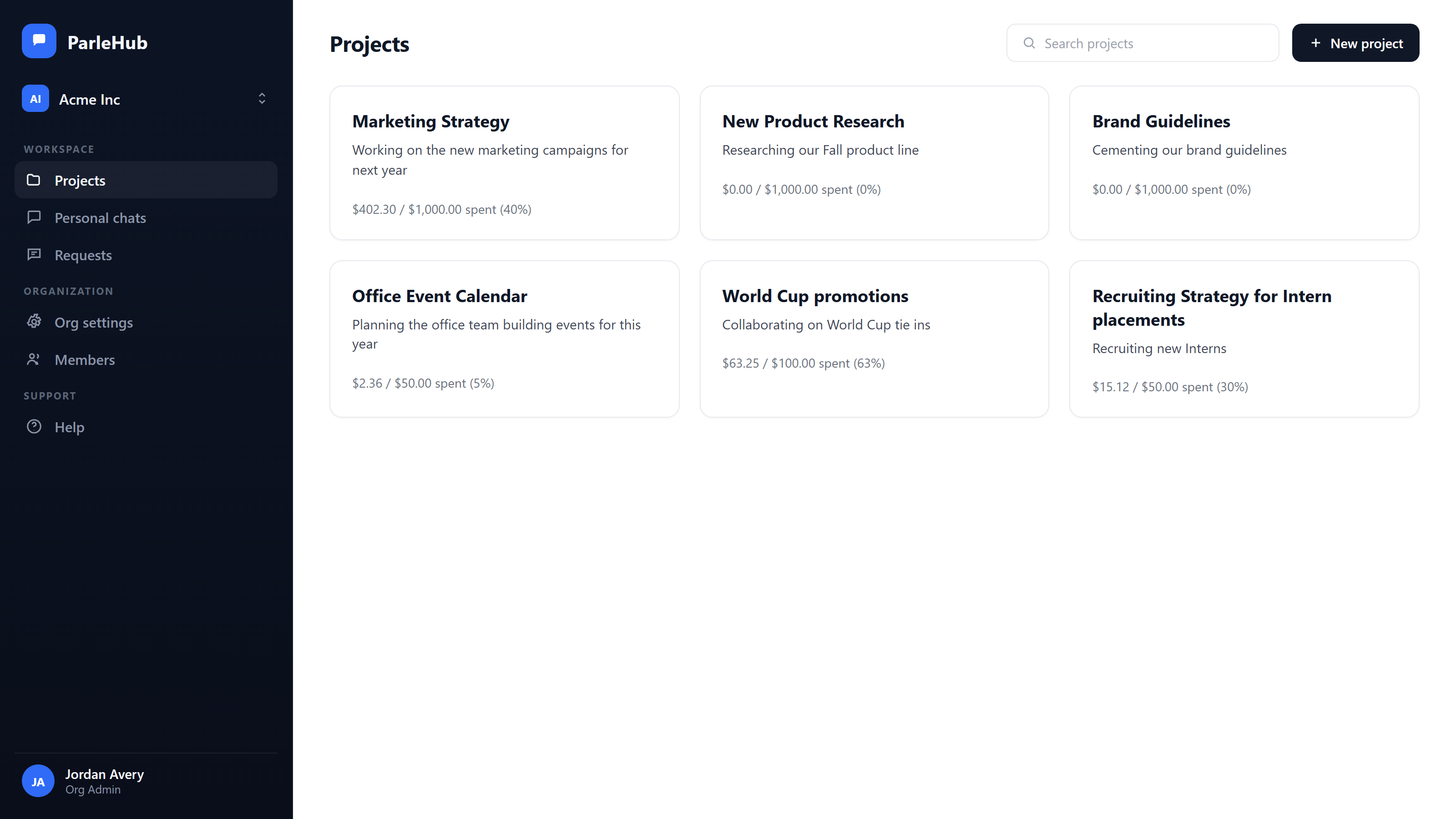
ChatGPT sets credit limits on the workspace, on a group, and on a user. ParleHub sets them on the project, which is the engagement, matter, or account you already bill against. Personal and org-wide caps sit underneath as backstops.
Whose code the cost carries
ChatGPT exports spend by user, group, product, and model. ParleHub exports it under your own project code, the client reference your general ledger already recognises, so finance imports it rather than rebuilding it.
Where the documents sit
ChatGPT reads your SharePoint and Drive through connectors, and files uploaded into a project are held in the OpenAI workspace. On ParleHub Enterprise your own SharePoint site or Shared Drive is the store of record.
A workspace cap tells you the total. Your partners asked about one client.
Credit limits on the workspace stop the invoice being a surprise, which is worth having. They do not tell you what the Ashworth deal cost, because the four people who worked it also worked six other engagements that month. The allocation gets rebuilt by hand from a report that was organised around people.
- check_circle Budgets set on the project, with per-user and org-wide caps stacked underneath
- check_circle A send that would take the project over budget is blocked before it runs, with a warning at 80%
- check_circle Anyone blocked can request an increase in one click, routed to an admin to approve or reject
- check_circle Analytics group by project, person, provider, or model, and export as CSV under your project code
A shared folder you check, or a room you are both in
Shared projects put the files and the chats in one place for the members of that project, which closes the worst of the gap. What they are not is live: you cannot watch a colleague work a problem, and two people cannot sit in the same conversation at once. The answer arrives later, in a list, and reading it back is a separate act of will.
- check_circle Live presence shows who is viewing, typing, or waiting on a response
- check_circle A teammate's in-flight message and the streamed reply appear to everyone watching the thread
- check_circle Keyword and semantic search across every conversation in the project, so a new joiner reads the work instead of rebuilding it
- check_circle Branch by edit-and-resend without losing the path that was already taken
One vendor's models, or the models you already pay for
ChatGPT Business and Enterprise are a way to buy OpenAI. Ordinary chat is covered by the seat, which is genuinely clean, and the heavier agentic work draws on a credit pool you buy separately. It also ties the workspace and the model together, and a firm that has already signed an enterprise agreement with a provider is paying for the same tokens twice. With us the two are separate purchases: bring that agreement, or use models we host and pay for what you use.
There is a third case neither vendor covers. A good deal of the cheap, capable capacity now comes from labs your firm will never contract with, because a forty-person practice is not a procurement target for anyone and self-hosting an open-weight model is an infrastructure project nobody asked for. We host those models, so routine drafting and summarising can run on something that costs a fraction of a frontier call while the analysis a partner signs stays on the model you trust for it. Spend is tracked per project either way, so whether the cheaper model was good enough stops being an argument and becomes a number on the engagement.
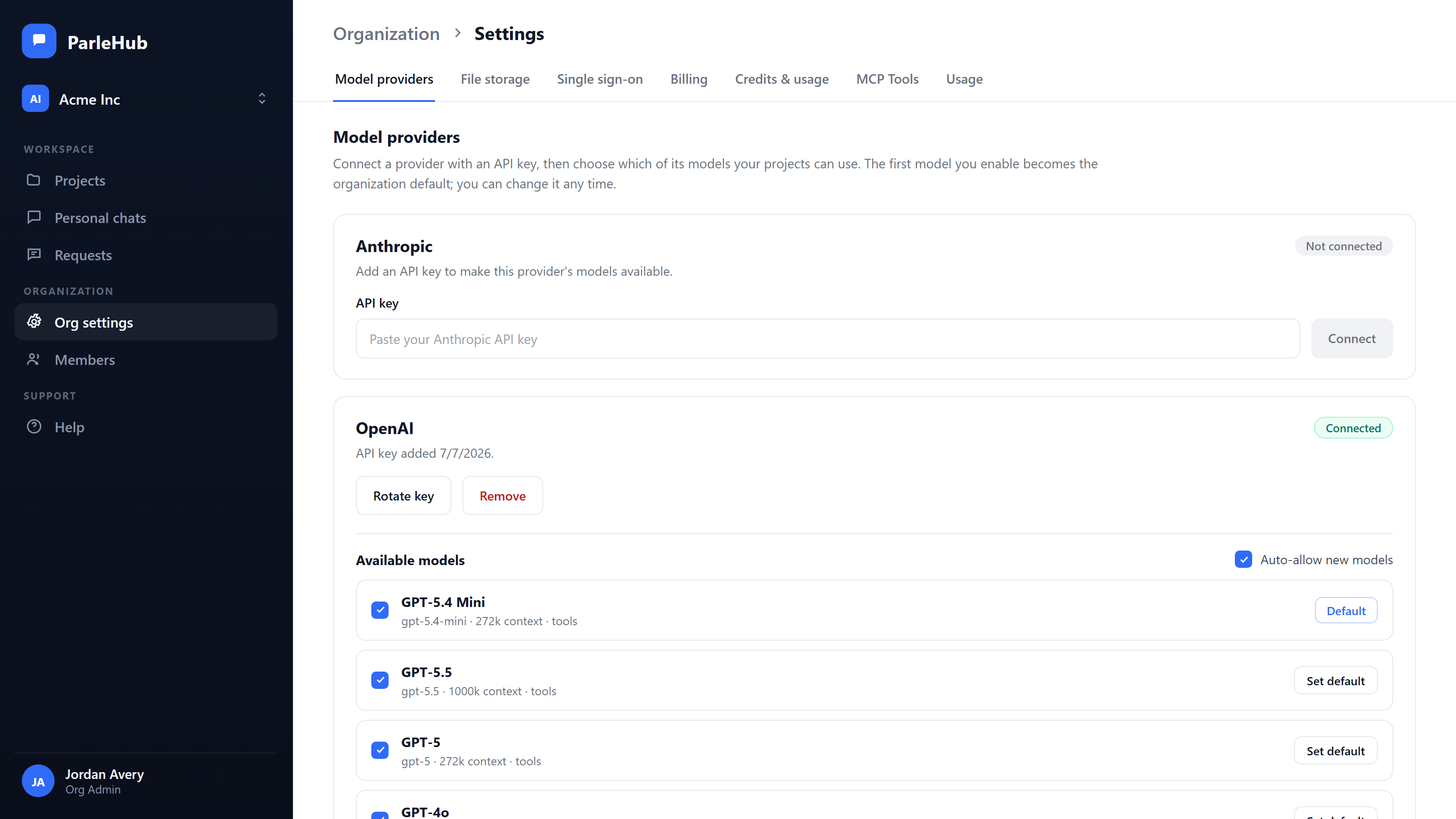
- check_circle Connect OpenAI, Anthropic, Google Gemini, and Azure OpenAI with your own keys, held in Azure Key Vault and never exposed
- check_circle Or skip the keys entirely and use models we host, charged by what you use. Run both at once if you want, on the same ledger
- check_circle That includes open-weight models from outside the big three, which your firm will never sign a contract with and should not have to
- check_circle Azure OpenAI for firms that want inference inside their own Azure subscription
- check_circle Calls run under your firm's own provider agreement, which is the agreement your client questionnaire asks about
- check_circle Switch model per conversation, deliberately, with no automatic routing or silent downgrade
Lock-in is a price you pay in the second year
Credits make the first year simple. The second year is where it costs you, because a competing model will get cheaper, or better at the specific work your firm sells, and the only question that matters then is what it takes to act on that. When the projects, the instructions, the uploaded files, and the searchable history all live in one vendor's workspace, acting on it means rebuilding all of it somewhere else.
ParleHub keeps the provider at the edge. Everything your team builds sits above it and does not move when the model does.
- check_circle Point one conversation at a different vendor's model when a single question needs it, keeping the thread, the project files, and the agent tooling
- check_circle Move a project or the whole organization onto another provider as a settings change; projects, threads, files, budgets, project codes, roles, and the audit trail are untouched
- check_circle Your keys or ours, so moving spend to a cheaper model is a commercial decision rather than a migration project. The same budgets, caps, project codes and ledger apply either way
- check_circle One ledger measures every provider, so the comparison that justifies the move comes from your own usage rather than a vendor's pricing page
Reading your SharePoint is not the same as living in it
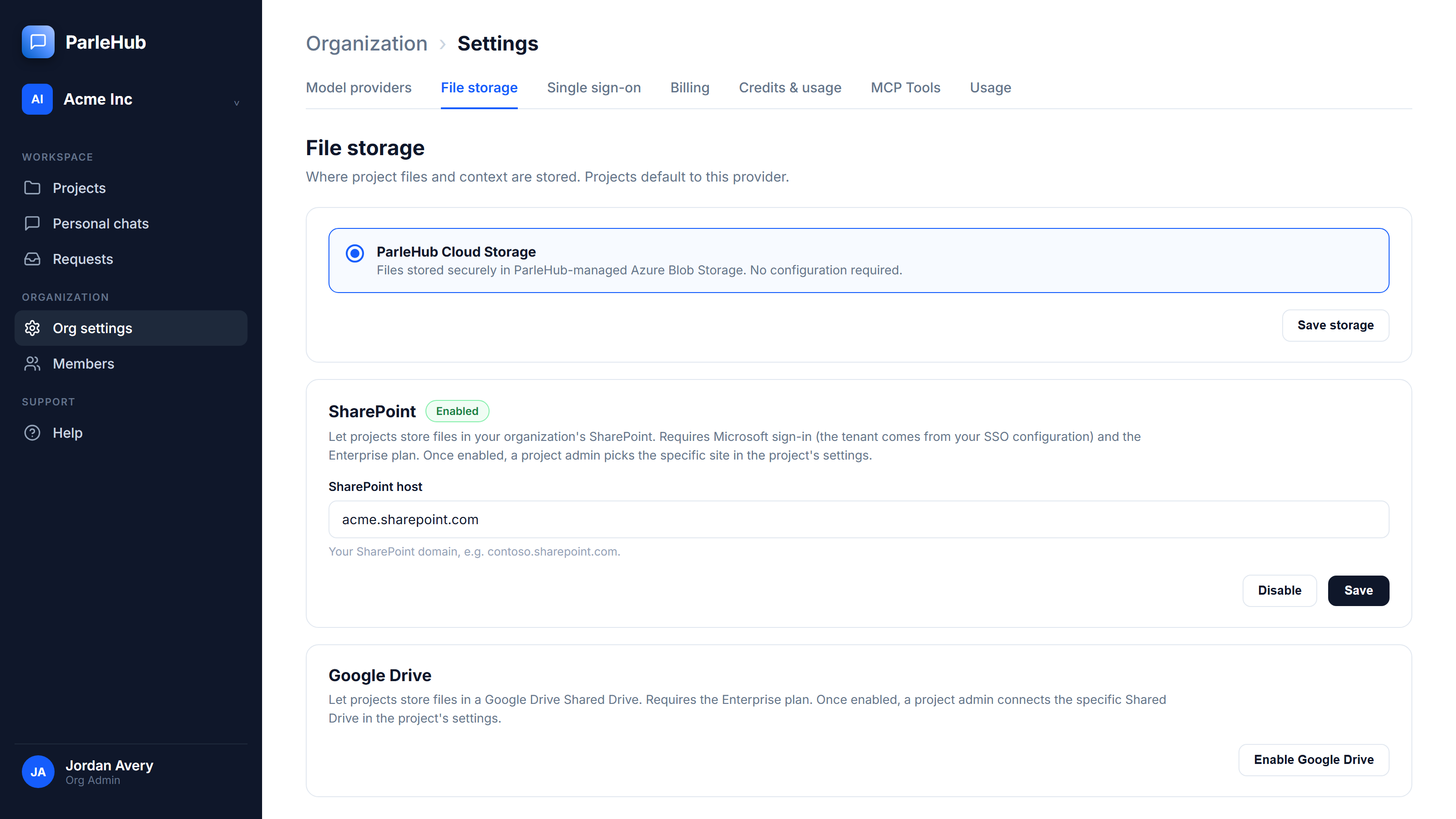
A connector lets ChatGPT answer from your OneDrive and SharePoint, which is genuinely useful. The working set a team uploads into a project is a different thing, and it sits in the OpenAI workspace. On ParleHub Enterprise, a project points at a named SharePoint site or Google Shared Drive of yours and the files never leave it.
- check_circle SharePoint with least-privilege, per-site Sites.Selected access, verified against a real production tenant
- check_circle Deletes go to your own recycle bin, under your own retention policy
- check_circle Google Shared Drives, with native Drive search and Docs, Sheets, and Slides export, verified against a real production Drive
- check_circle More detail on the whole control set on our security page
The full comparison
The ChatGPT column describes the Business and Enterprise plans as documented by OpenAI in September 2026, after the June 2026 spend controls update. Where a capability is Enterprise-only on either side, the cell says so.
| Capability | ParleHub | ChatGPT Business & Enterprise |
|---|---|---|
| Budget scoped to a project | Yes, the primary budget unit | No |
| Other budget scopes | Per user, org-wide | Workspace, group, per user |
| Your expense code on spend | Project code field, carried into the CSV export | No |
| Budget period | Per project budget, plus monthly caps | Monthly credit limits |
| Behaviour at the cap | Send blocked before it runs, warning at 80% | Limit reached, alerts to admins and the user |
| Self-serve increase request | Yes, routed to an admin | Yes, routed to an admin |
| Cost reporting dimensions | Project, person, provider, model | User, group, product, model |
| Usage export | CSV | Export to financial systems, Cost API |
| Team threads shared by default | Yes, every thread in the project | Yes, within a shared project |
| Live presence and streamed replies | Yes | No |
| Model choice | OpenAI, Anthropic, Gemini, Azure OpenAI on your own keys, plus open-weight models we host | OpenAI models |
| Models you have no contract with | Available, hosted by us, no procurement | Not applicable |
| Whose provider agreement | Yours on your own keys, or ours on models we host | OpenAI's |
| How model usage is paid for | Your choice: on your own provider contract at your rate, or by consumption on models we host, with no key at all | Seat covers ordinary chat; advanced and agentic use draws on a purchased credit pool |
| Switch a live conversation to another vendor's model | Yes, the thread carries over | No, OpenAI models only |
| Cost of moving to a cheaper provider | A settings change; projects, threads, files, budgets and roles stay put | Rebuild the workspace elsewhere |
| Project files in your own tenant | SharePoint or Google Shared Drive (Enterprise) | No; connectors read from SharePoint and Drive |
| Answering from the firm's own documents | One org-wide corpus bound to your SharePoint or Drive library, with a per-project opt-out. Citations name the document, its version and its section; retiring a version removes it from the index | Company knowledge answers from connected apps including SharePoint, Google Drive and Slack, with citations and links back to the source, honouring each user's existing file permissions |
| Single sign-on | Microsoft Entra ID, Google Workspace (Team & Enterprise) | Yes |
| Role model | Four levels, org through project member | Roles and groups, directory-provisioned |
| Audit log | Append-only, enforced at the core platform level | Yes, with a compliance API |
Four reasons to pick OpenAI instead
A comparison page that finds nothing good to say about the other product is a sales sheet. These are the cases where we would tell you to buy ChatGPT.
- arrow_right_alt You want a flat per-head cost with no meter running. Everyday chat comes with the ChatGPT seat, so ordinary use is predictable per person and nobody watches a balance. We can host your models with no key to manage, but hosted usage is charged by consumption, which is a different budgeting shape even when it costs less.
- arrow_right_alt Your cost centres are departments, not clients. If AI spend belongs to Marketing and Legal rather than to engagements, workspace and group caps mapped from your directory are a closer fit than project budgets, and OpenAI has them.
- arrow_right_alt You need answers filtered per person, file by file. Company knowledge honours each user's existing SharePoint permissions, so two people asking the same question get answers drawn from different documents. That is finer-grained than we are: a ParleHub project conversation is one broadcast answer, so our corpus is a set an admin published for everyone rather than a per-person view of everything. If your documents are sensitive file by file rather than published firm-wide, theirs is the right model.
- arrow_right_alt You need the widest app and connector surface. OpenAI connects to a long list of business systems and ships new ones constantly. Our file tooling is deep on documents and spreadsheets inside a project; it is not a directory of integrations.
The other two head-to-heads
The same questions, asked of Anthropic's and Google's team products.
Every claim about ChatGPT on this page comes from OpenAI's own documentation and announcements, read in September 2026. Products move; if something here has gone out of date, we would rather fix it than keep it.
- Managing credits and spend controls in ChatGPT Business
- More ways to work with your team and tools in ChatGPT
- Company knowledge in ChatGPT (Business, Enterprise, Edu)
- SharePoint app in ChatGPT
- ChatGPT Business release notes
ChatGPT and OpenAI are trademarks of OpenAI. ParleHub is not affiliated with or endorsed by OpenAI.
Keep the models. Move the workspace.
Connect the OpenAI key you already have, put one live engagement in a project, and give it a budget and a code. The first export tells you whether the argument holds.
Start free at app.parlehub.com arrow_forward