Claude budgets by person. ParleHub budgets by engagement.
Anthropic gives admins org, group, and per-user spend caps, and gives teams Projects with shared knowledge. Both are real and both work. If your firm allocates cost to clients rather than to headcount, the axis is wrong, and no amount of per-user reporting converts it.
Checked against Anthropic's published documentation, September 2026. Sources listed at the foot of this page.
ParleHub runs on Claude. Anthropic's models are one of the four provider families you can connect, alongside OpenAI, Google Gemini, and Azure OpenAI. This page is not an argument that Claude is the wrong model. It compares Anthropic's own team workspace with ours, for a firm deciding where its people should be having those conversations and how the cost gets booked.
Three differences that change the answer
The unit of the budget
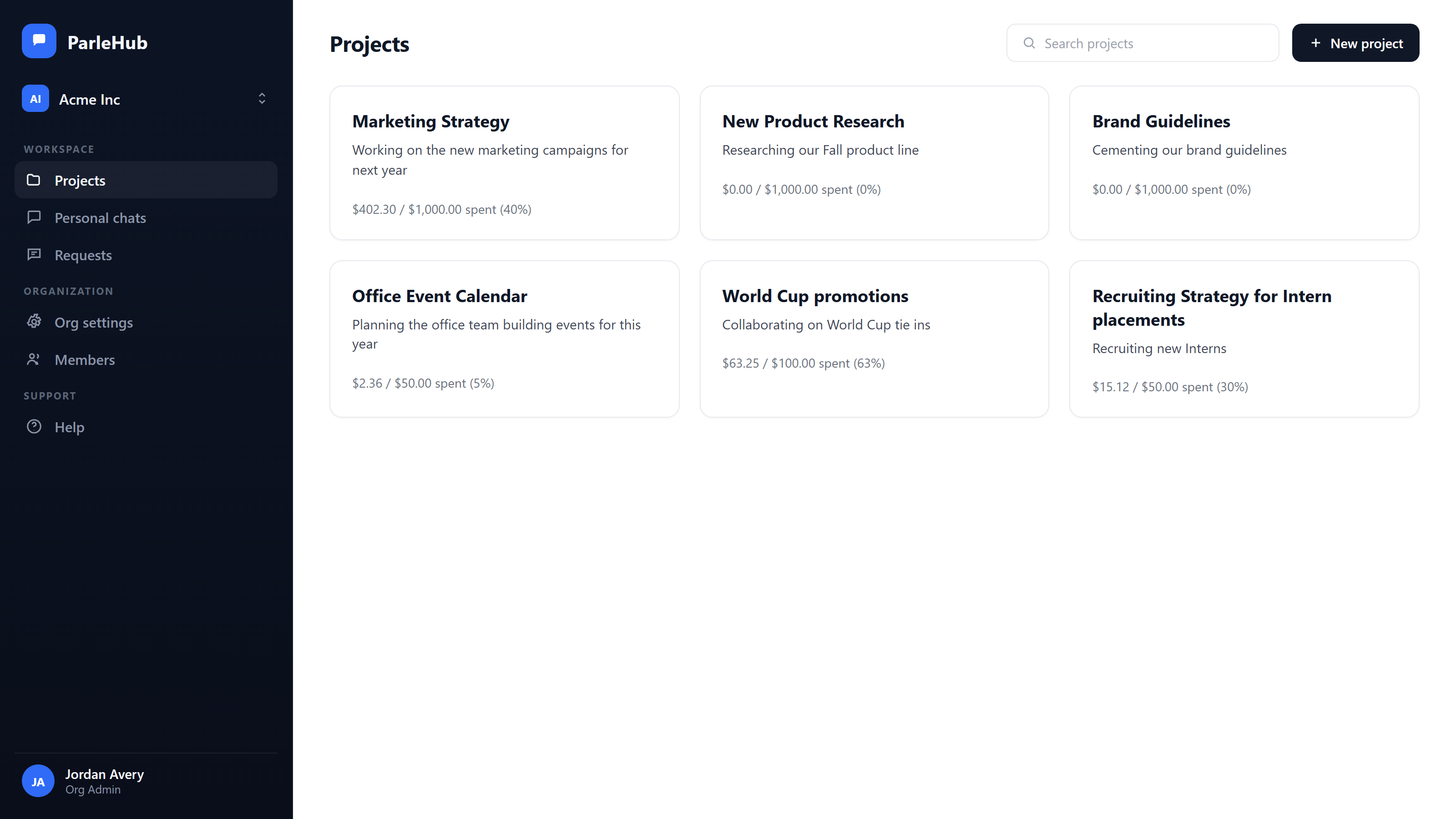
Claude caps spend on the organization, a group, or a named user. ParleHub caps it on the project, which is the engagement, matter, or account you already bill against. Personal and org-wide caps sit underneath as backstops.
Whose code the cost carries
Every ParleHub project carries your own expense code, and that code comes through in the CSV export. The spend arrives in finance already labelled with the client reference your general ledger recognises, with no join to build.
What "shared" means
A shared Claude Project shares its knowledge and instructions; chats inside it stay private to their author unless someone deliberately shares them. In ParleHub the thread itself is the shared object, live, with presence.
Per-user caps answer a question your firm is not asking
A per-user cap tells you that a senior consultant spent $340 last month. Your partners want to know what the Ashworth deal cost. One person works four engagements in a month and the other three people on Ashworth each have their own cap, so the number has to be reassembled by hand, every month, from a report that was never organised that way.
- check_circle Budgets set on the project, with per-user and org-wide caps stacked underneath
- check_circle A send that would take the project over budget is blocked before it runs, with a warning at 80%
- check_circle Anyone blocked can request an increase in one click, routed to an admin to approve or reject
- check_circle Analytics group by project, person, provider, or model, and export as CSV
Shared context is not the same as a shared conversation
A Claude Project shares the knowledge base and the instructions, so nobody re-uploads the same eleven exhibits. Anthropic's documentation is explicit that the chats inside it are not shared by default and stay inaccessible to other members unless the author shares them. The reasoning that produced last Thursday's answer is still in one person's history.
- check_circle Every thread in a ParleHub project is visible to its members as it happens
- check_circle Live presence shows who is viewing, typing, or waiting on a response, and the streamed reply appears to everyone watching
- check_circle Keyword and semantic search across every conversation in the project, so a new joiner reads the work instead of rebuilding it
- check_circle A useful personal chat can be promoted into the shared project
One vendor's models, or the models you already pay for
Claude Team and Enterprise are a way to buy Claude. Enterprise is priced per seat plus the tokens your org consumes, so the meter is running either way; what you are buying is Anthropic's meter rather than your own. It also means the workspace and the model are the same commercial decision, and changing your mind about one changes the other. With us the two are separate purchases: bring the provider contract you already signed, or use models we host and pay for what you use.
There is a third case neither vendor covers. A good deal of the cheap, capable capacity now comes from labs your firm will never contract with, because a forty-person practice is not a procurement target for anyone and self-hosting an open-weight model is an infrastructure project nobody asked for. We host those models, so routine drafting and summarising can run on something that costs a fraction of a frontier call while the analysis a partner signs stays on the model you trust for it. Spend is tracked per project either way, so whether the cheaper model was good enough stops being an argument and becomes a number on the engagement.
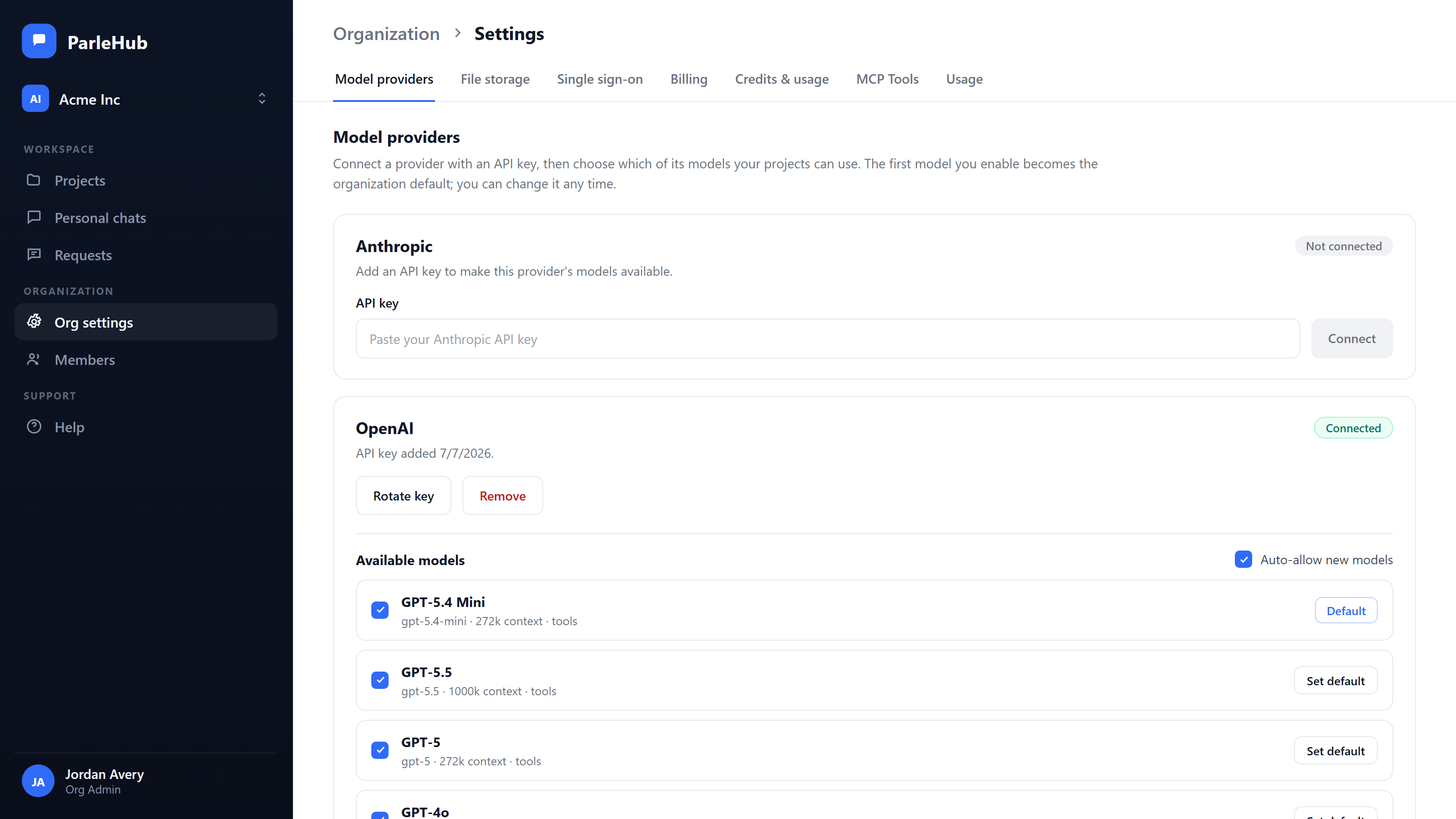
- check_circle Connect Anthropic, OpenAI, Google Gemini, and Azure OpenAI with your own keys, held in Azure Key Vault and never exposed
- check_circle Or skip the keys entirely and use models we host, charged by what you use. Run both at once if you want, on the same ledger
- check_circle That includes open-weight models from outside the big three, which your firm will never sign a contract with and should not have to
- check_circle Calls run under your firm's own provider agreement, which is the agreement your client questionnaire asks about
- check_circle Switch model per conversation, deliberately, with no automatic routing or silent downgrade
- check_circle Every call lands in one ledger, so the comparison across providers is like for like
The best model for your work in 2027 is not the one you signed up for
Model prices fall in steps, and each step is an opportunity you can only take if taking it is cheap. When the workspace belongs to the model vendor, switching means rebuilding it: the projects, the instructions, the uploaded knowledge, the history your team searches. Most firms price that at more than the saving and stay where they are, which is the point of selling the workspace and the model together.
ParleHub keeps the provider at the edge. Everything your team builds sits above it and does not move when the model does.
- check_circle Point one conversation at a different vendor's model when a single question needs it, keeping the thread, the project files, and the agent tooling
- check_circle Move a project or the whole organization onto another provider as a settings change; projects, threads, files, budgets, project codes, roles, and the audit trail are untouched
- check_circle Your keys or ours, so moving spend to a cheaper model is a commercial decision rather than a migration project. The same budgets, caps, project codes and ledger apply either way
- check_circle One ledger measures every provider, so the comparison that justifies the move comes from your own usage rather than a vendor's pricing page
Client documents can stay in your tenant
Anthropic's Microsoft 365 and Google Workspace connectors let Claude search a person's own SharePoint, OneDrive and Drive without uploading anything, which is a real answer to the copy-everything problem. What it is not is a place for the project's files to live: each member connects their own account and searches what they personally can see, and anything you upload to the project's knowledge base is held by Anthropic.
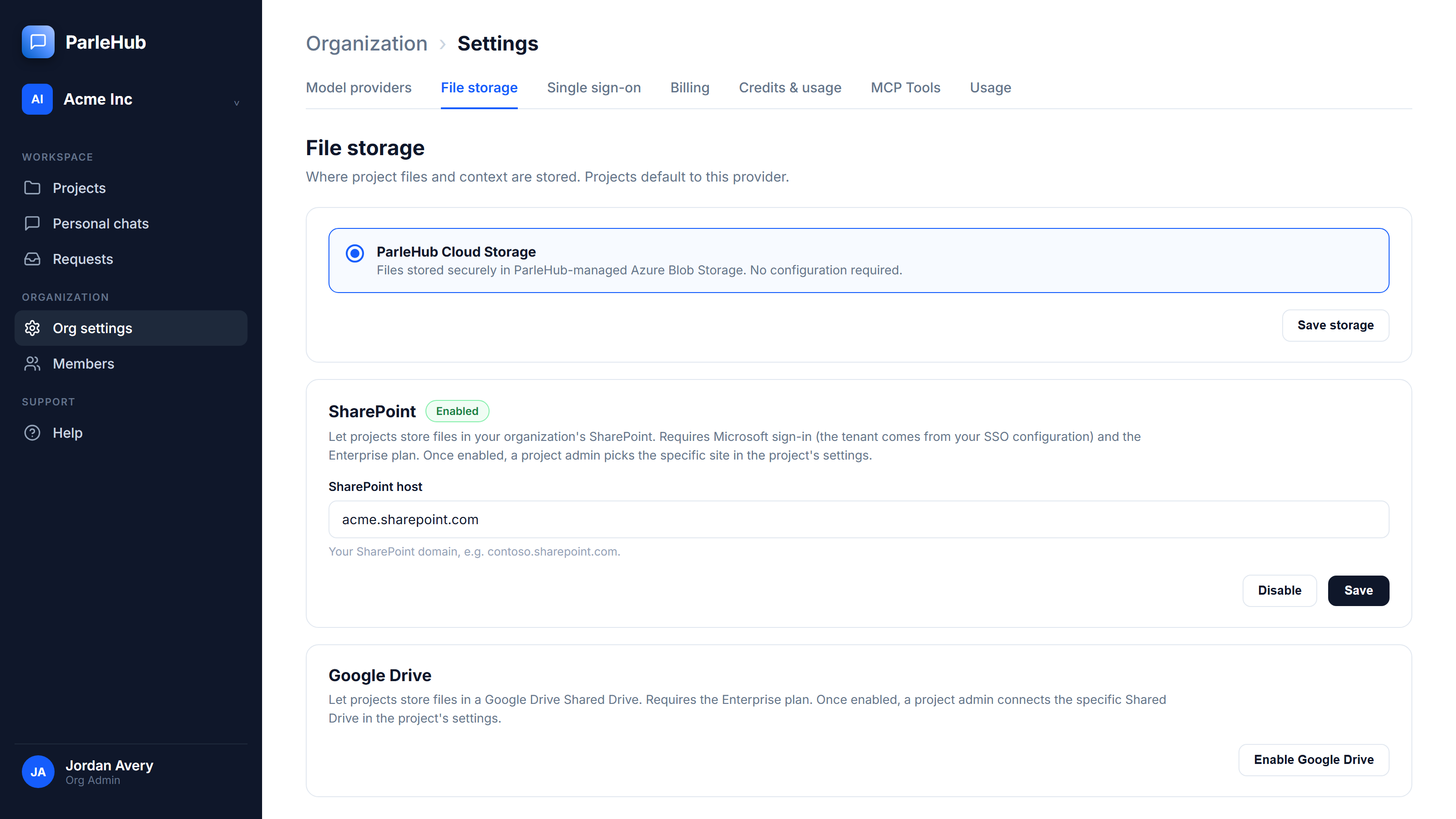
On ParleHub Enterprise the project's storage is your tenant. Files the team adds, and the ones the agent reads and edits, sit in a specific SharePoint site or Google Shared Drive of yours under your retention policy, your permissions and your recycle bin, reachable by the whole project rather than by whoever's account happened to be connected.
- check_circle SharePoint with least-privilege, per-site Sites.Selected access, verified against a real production tenant
- check_circle Google Shared Drives, with native Drive search and Docs, Sheets, and Slides export, verified against a real production Drive
- check_circle Managed storage on every tier if you would rather we held them
- check_circle More detail on the whole control set on our security page
The full comparison
Claude column describes the Team and Enterprise plans as documented by Anthropic in September 2026. Where a capability is Enterprise-only on either side, the cell says so.
| Capability | ParleHub | Claude Team & Enterprise |
|---|---|---|
| Budget scoped to a project | Yes, the primary budget unit | No |
| Other budget scopes | Per user, org-wide | Org, group, per user |
| Your expense code on spend | Project code field, carried into the CSV export | No |
| Behaviour at the cap | Send blocked before it runs, warning at 80% | Usage is limited once the limit is hit; admin alerts at 75% and 90%, in-app user notifications at 75% and 95% |
| Self-serve increase request | Yes, routed to an admin | Yes, routed to an admin |
| Cost reporting dimensions | Project, person, provider, model | Group, user, product, model |
| Usage export | CSV | Analytics API, exportable charts |
| Team threads shared by default | Yes, every thread in the project | No, chats are private unless shared; knowledge and instructions are shared |
| Live presence and streamed replies | Yes | No |
| Model choice | Anthropic, OpenAI, Gemini, Azure OpenAI on your own keys, plus open-weight models we host | Claude models |
| Models you have no contract with | Available, hosted by us, no procurement | Not applicable |
| Whose provider agreement | Yours on your own keys, or ours on models we host | Anthropic's |
| How model usage is paid for | Your choice: on your own provider contract at your rate, or by consumption on models we host, with no key at all | Per seat plus metered consumption, billed by Anthropic at Anthropic's rate |
| Switch a live conversation to another vendor's model | Yes, the thread carries over | No, Claude models only |
| Cost of moving to a cheaper provider | A settings change; projects, threads, files, budgets and roles stay put | Rebuild the workspace elsewhere |
| Where a project's files live | Your own SharePoint site or Google Shared Drive, as the project's storage (Enterprise) | Uploaded project knowledge is held by Anthropic; the Microsoft 365 and Google Workspace connectors search your tenant instead of uploading, per user |
| Answering from the firm's own documents | One org-wide corpus bound to your SharePoint or Drive library, with a per-project opt-out. Citations name the document, its version and its section; retiring a version removes it from the index | A knowledge base per project, plus per-user connector search across SharePoint, OneDrive and Drive; Google Docs added to a project sync from Drive |
| Single sign-on | Microsoft Entra ID, Google Workspace (Team & Enterprise) | Yes (Enterprise) |
| Role model | Four levels, org through project member | Roles and groups, directory-provisioned |
| Audit log | Append-only, enforced at the core platform level | Yes, with compliance tooling |
Four reasons to pick Anthropic instead
A comparison page that finds nothing good to say about the other product is a sales sheet. These are the cases where we would tell you to buy Claude.
- arrow_right_alt You want Anthropic's whole model line, first-party. Every Claude model Anthropic ships, on the day it ships, metered by the company that built it. We can run Anthropic models on your own key, and we host a curated set of models ourselves, but a curated set is a choice someone made and the first-party line is not.
- arrow_right_alt Your cost centres are departments, not clients. If AI spend belongs to Marketing and Legal rather than to engagements, group and per-user caps mapped from your directory are a closer fit than project budgets, and Anthropic has them.
- arrow_right_alt Your main use is engineering work. ParleHub is not a coding tool and has no coding harness. Anthropic's developer surfaces are built for that and we are not competing for it.
- arrow_right_alt You want Claude across a person's whole working day. Anthropic's Microsoft 365 and Google Workspace connectors reach one person's mail, calendar, Teams and drive, which is a wider surface than ours. We bind a project to a document library the firm publishes; we do not read your inbox, and for some teams that is the more useful of the two.
The other two head-to-heads
The same questions, asked of OpenAI's and Google's team products.
Every claim about Claude on this page comes from Anthropic's own documentation, read in September 2026. Products move; if something here has gone out of date, we would rather fix it than keep it.
- What are projects?
- Manage project visibility and sharing
- Claude Enterprise consumption guide
- New analytics and cost controls for Claude Enterprise
- Set up the Microsoft 365 connector
- Use Google Workspace connectors
Claude and Anthropic are trademarks of Anthropic PBC. ParleHub is not affiliated with or endorsed by Anthropic.
Keep the models. Move the workspace.
Connect the Anthropic key you already have, put one live engagement in a project, and give it a budget and a code. The first export tells you whether the argument holds.
Start free at app.parlehub.com arrow_forward